

Accessing the JME
This page outlines how Museum Education Roundtable members can access the Journal of Museum Education.
Not a member yet? You can join here!
Want to find open access JME articles? You can view that archive here.
All MER members have full digital access to the Journal of Museum Education, including all articles behind a paywall and the entire MER archive, beginning in 1973. Additionally, all members except online-only members receive a physical copy of each issue of the JME each quarter. The JME is published in partnership with Taylor and Francis. Your online access is verified through Wild Apricot, our membership management platform, using our website.
To access the JME through MER’s website:
- On MER’s website, click the “member login” button on the top right of every page and enter your MER account credentials.
- Navigate to “Journal” -> “JME Online” and click on the issue you would like to view. (If you want to browse through MER’s articles, click on any issue.) This will bring up a menu listing the articles in the issue, with link at the bottom reading, “FULL ISSUE.” Click on this link.
- This will bring you through to that issue of JME on the Taylor & Francis website. From there, you can view that issue, navigate to the JME’s homepage by clicking the house icon next to “Journal of Museum Education” in the dark blue header, or search previous JME issues.
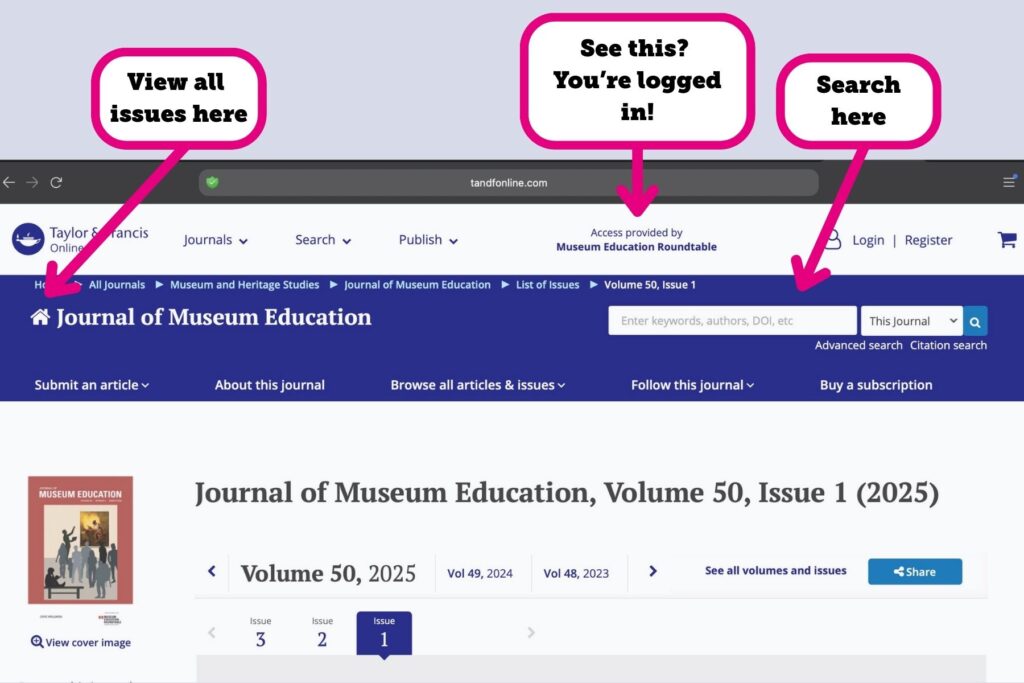
Troubleshooting access:
- Credential issue. Your log-in credentials will only work on MER’s website. If you’re unable to log in using your credentials, contact us.
- Link issue. If you’ve clicked on a link to the JME from any website other than museumedu.org, check the link. If it’s a doi link, it will not grant you access through your MER membership. The only way to access JME issues or articles that are behind T&F’s paywall by first logging in through MER’s website.
- Other errors.
- If you’ve attempted to log in and haven’t had success, try a different browser.
- If trying a different browser doesn’t solve the issue, check your security settings. You may have enabled security features that block the third-party requests necessary for log-in. If you have the option, enable third-party requests from Cloudflare.
- If it doesn’t seem like security is the issue, try clearing your cookies and beginning the process again.
If you continue to experience issues, reach out to us!